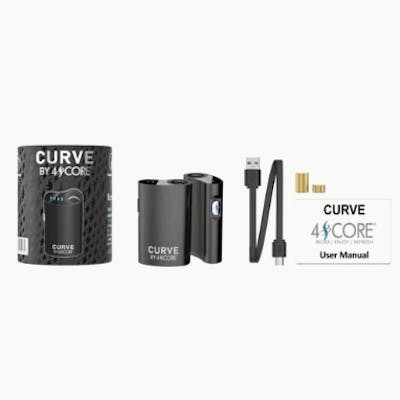
Curve 510 Battery
$30.00
Quantity
1
Product description
CURVE FIRST TIME USERS If you are using the CURVE be sure that you screw the magnetic ring found in your CURVE box to your cartridge before attaching the cartridge to the battery. CONTENTS: CURVE Device USB Charger x2 Magnetic Rings Instruction Card POWERING ON/OFF In order to turn your CURVE on/off simply click the button 5 times. Your battery light will blink blue five times indicating that it is now turned on/off. ATTACHING CARTRIDGE Attach your 510 threaded cartridge to one of the magnetic rings (included in CURVE box). Screw the magnetic ring to the threaded part of your cartridge. Slide the cartridge with the magnetic end down the center of the CURVE – the magnetic ring will quickly snap into place. VOLTAGE ADJUSTMENT The CURVE has three separate voltage settings. To change the voltage, click the button three times. You will see the LED on the top blink. Each color represents the following voltages: Green 3.3V, Blue 3.6V, and Red 3.9V. To inhale you have two options, the first is to simply draw from the CURVE without pressing the button, this is the auto draw feature. If you prefer to be in full control, simply press and hold the button the entire time that you draw on the CURVE. CHARGING Your CURVE comes with a USB charger. To charge, connect your charger to the CURVE by plugging it into the bottom (only one end will properly fit) of the CURVE. Plug your charger into a USB compatible charging block such as a computer, phone charger, or other device. TIP: Different charging blocks charge differently. Some charging blocks work better than others. If your CURVE is not charging properly, try using a different charging block.
Batteries
Prices, both original and discounted price, are set by the retailer and not set or verified by Weedmaps.